
Early Access
Linaro Forge Automation: Profiling and Debugging for AI Agents
An MCP server that lets AI agents run Linaro MAP, Linaro DDT and Performance Reports on your Slurm cluster, read the results and act on them.
MCP · Slurm · SSH
- Works with any MCP client, such as Claude Code or your own agents.
- Runs over SSH as your own user, with no admin access.
- Uses the Linaro Forge tools already installed on your cluster.
How It Works
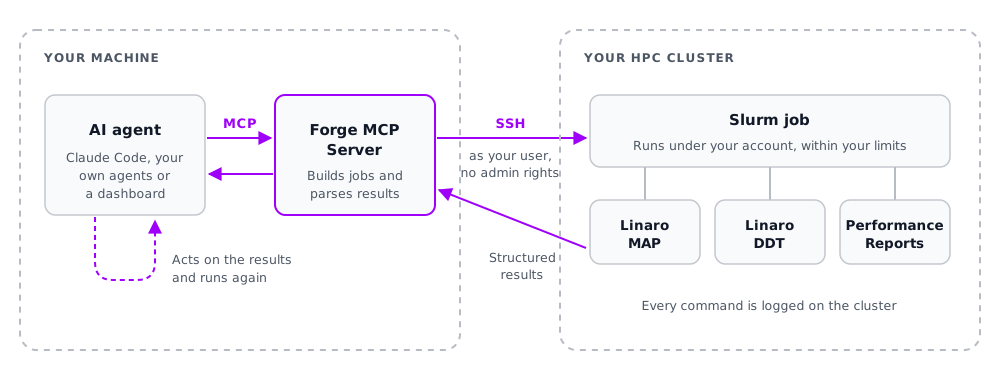
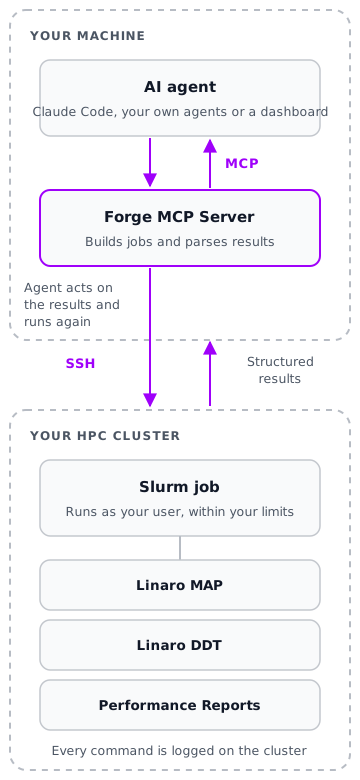
The MCP server runs on your machine and connects to your cluster over SSH. Your agent asks for a profile or a debug run; the server submits the Slurm job, runs the Linaro Forge tool and returns structured results.
1. Your AI Agent
Claude Code, your own agent or a dashboard asks for a profile, a debug run or a scaling test.
2. The MCP Server
Turns each request into a Slurm job using Linaro MAP, Linaro DDT or Performance Reports, and returns the results as structured data.
3. Your Cluster
Jobs run under your account, within your normal Slurm limits, using the Linaro Forge installation already there.
What Agents Can Do
The same Linaro Forge tools your engineers use, driven by an agent that can run, read and repeat without manual scripting.
Profile and Tune
Run jobs under Linaro MAP or Performance Reports, get compute, MPI, memory and I/O breakdowns as structured data, and see the functions that take the most time.
Debug Without a GUI
Run Linaro DDT in batch mode to catch memory leaks, buffer overflows and use-after-free errors, check variables across MPI ranks, and report the exact source line.
Test Scaling
Run the same job across a range of node counts, calculate the speedup and find the point where adding nodes stops helping.
Run and Diagnose Slurm Jobs
Discover partitions and GPUs, read job logs for out-of-memory, crash, MPI and licence errors, and check that expected output files really exist.
Results can also be sent to Prometheus for Grafana dashboards, with estimated compute-hour and cost savings between builds.
Case Study: An Agent Optimises an N-body Simulation
A domain scientist’s gravitational simulation (2,000 particles, 300 time steps), written for correct physics first, running on a 4-core Arm system. Through the MCP server, the agent used Performance Reports and Linaro MAP to decide each change, kept only the ones that helped, and checked every result against the original.
9.2×
faster than the original build
4.9×
from the agent’s code changes alone, beyond -O2
25→100%
core use, after Performance Reports showed idle cores
Identical
results, bit for bit, at every kept step
Step
What the profile showed
What the agent did
Runtime
Outcome
0
Original build, no optimisation flag
Measured a baseline
6.41 s
Baseline
1
The compile command had no optimisation level
Added -O2
3.39 s
Kept, 1.9×
2
Compute-bound, but only 25% of cores in use
Spread the force loop across 4 cores with OpenMP
1.08 s
Kept, 5.9×
3
99.4% of the time in one force function
Computed each pair’s force once, using Newton’s third law
0.855 s
Kept, 7.5×
4
Still the same function
Replaced repeated divisions with one reciprocal
0.78 s
Kept, 8.2×
5
Still the same function
Changed the data layout to arrays per field
0.696 s
Kept, 9.2×
6
No exact changes left
Tried the Barnes–Hut approximation: 0.34% energy error
0.347 s
Proposed for the scientist to decide
7
—
Tried single-precision forces on top
0.347 s
Rejected: no gain
The agent applied only changes that kept the results identical. The approximation would double the speed again, but it changes the answer slightly, so the agent proposed it with its accuracy cost instead of applying it.
Debugging: Seeded Memory Bugs
Linaro DDT, run in batch mode by the agent, caught all three bugs in small C test programs:
Bug
How Linaro DDT was run
Result
Memory leak
Batch mode with memory debugging
715 leaks (183 kB) found, traced to line 29
Buffer overflow
With bounds checking
Off-by-one heap overflow found at line 20
Use-after-free
With thorough memory checking
Write through a dangling pointer caught
Built for Cluster Security
Designed to work within the rules of a shared HPC system.
- Runs as you: standard key-based SSH as your own user, with no sudo access and no admin services to install.
- Safe commands: every argument is quoted before it reaches the shell, and unsafe job options are rejected.
- Contained: commands and build files stay in one workspace directory on the cluster.
- Audited: every remote command is logged on the cluster with its time, duration and exit code.
What You Need
- SSH key access to a Slurm cluster
- Linaro Forge installed on the cluster
- Python 3 on your own machine
- An MCP-compatible AI client or agent
Join the Early Access Programme
Early access partners get regular contact with our product team and priority support, and a say in what we build next. Tell us about your agent workflows, your Slurm setup and the codes you want to profile and debug.